

Adobe Acrobat is best for people who receive and sign PDFs from clients every week, offices already paying for Adobe software and anyone who needs a PDF editor month to month, without a year's commitment. Its clearest advantage: A month-to-month plan that can be cancelled at any time without a fee.
- Avoid if
- occasional users: Acrobat Reader is free for reading, filling and signing
- Cheapest useful plan
- €30.24/mo · Standard
- Free plan
- No
- Setup effort
- easy: minutes
- Main limitation
- Month to month costs about two thirds more than the annual plan billed monthly
- A month-to-month plan that can be cancelled at any time without a fee
- Acrobat Reader stays free for reading, filling and signing
- Standard, Pro and Studio are all on one pricing page, with VAT included
- occasional users: Acrobat Reader is free for reading, filling and signing
- budget-first buyers who can commit to a year: the annual price is about 40 % lower
What it actually does
Create, edit, convert, export and organise PDFs, e-signature requests with tracking, fill, sign and password-protect PDFs, AI Assistant in Acrobat Studio.
Before you pay
Which plan, for whom
Acrobat Reader is free for reading, filling and signing a PDF someone sends you. You pay when you need to create, edit or convert PDFs, or send documents for signature with tracking. Standard covers that, and Studio adds the AI Assistant.
What a year costs
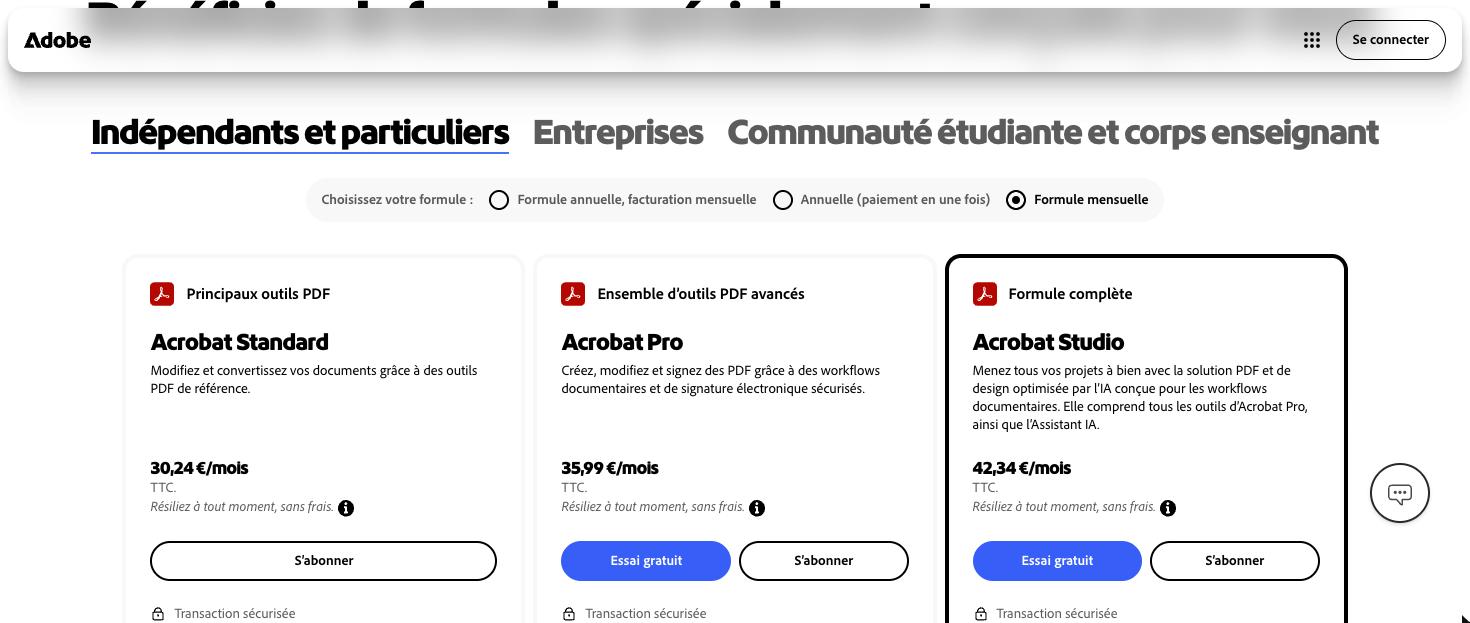
Prices include VAT. Month to month, Standard is 30.24 € a month, 362.88 € over a year, and Pro 35.99 €, 431.88 € a year. On the annual plan billed monthly, Standard is 18.14 € and Pro 23.99 € a month, 217.68 € and 287.88 € a year. Paid upfront, Standard is 214.78 € and Pro 286.42 € a year. Month to month costs about two thirds more than the annual plan.
What we would check before paying
The cancellation terms: the annual plan billed monthly charges half the remaining commitment if you cancel after 14 days, while month to month can be stopped at any time without a fee. The free trial is offered on Pro and Studio, not on Standard. For a freelancer who mostly edits and converts, the cheaper editors are worth comparing first.
The limits to know
- Month to month costs about two thirds more than the annual plan billed monthly
- The annual plan billed monthly charges half the remaining commitment if you cancel after 14 days
- The free trial is offered on Pro and Studio, not on Standard
Pricing & billing commitment
- Rate on record
- €30.24/mo · Standard
- What that figure is
- Month-to-month rate per account, read on the vendor's monthly view.
- Commitment
- None: payable one month at a time
- The vendor's exact condition
- 30.24 EUR/month incl. VAT month to month, cancel any time; 18.14 EUR/month on an annual plan billed monthly; 214.78 EUR/year paid upfront
The pricing page, as read
In practice
- Platforms
- Web, Windows, macOS, iOS, Android
- Setup
- easy: minutes
Adobe Acrobat in our comparisons
Alternatives to Adobe Acrobat


Compare side by side:Adobe Acrobat / Foxit PDF EditorAdobe Acrobat / iLovePDFAdobe Acrobat / Smallpdf
Frequently asked questions
What is Adobe Acrobat?
Adobe Acrobat is a tool from Adobe, used mainly for editing and converting PDFs, collecting e-signatures, filling, signing and protecting PDFs. Main features: create, edit, convert, export and organise PDFs, e-signature requests with tracking, fill, sign and password-protect PDFs. It has no permanent free plan; the paid entry point is €30.24/mo · Standard.
How much does Adobe Acrobat cost?
The paid entry point is €30.24/mo · Standard. Month-to-month rate per account, read on the vendor's monthly view. The exact condition attached to that figure: 30.24 EUR/month incl. VAT month to month, cancel any time; 18.14 EUR/month on an annual plan billed monthly; 214.78 EUR/year paid upfront. Read on the official pricing page on 25.10.2026. Prices move quickly: confirm before subscribing.
Does Adobe Acrobat have a free plan?
No. Adobe Acrobat has no permanent free plan, only a free trial. Using it for real work costs €30.24/mo · Standard.
What devices and tools does Adobe Acrobat work with?
According to the vendor's documentation, Adobe Acrobat runs on: Web, Windows, macOS, iOS, Android. Listed from the official sources, not tested by us: check your own setup during the trial.
How we checked this record
The evidence record
- Evidence level
- Vendor documented: Official documentation and pricing page reviewed and dated. No independent verification, no hands-on test recorded.
- Affiliate status
- No affiliate link on this record, no commission.
Hands-on test
No automated hands-on test has been completed for this review cycle. This record rests on the vendor's official documentation and pricing page, re-read and dated. We say so rather than imply otherwise.
The research record
Read on the vendor's monthly view, from France
Sources
The official pages this record rests on. No tracking links here: these addresses name the vendor.
Evidence freshness
Each kind of check has its own clock and its own threshold. A price ages in weeks and a feature list in months; sharing one date between them would let an old review pass for a recent check.
| Check | When | State |
|---|---|---|
| Pricing | Checked 18 days ago | Fresh |
| Features | Checked 18 days ago | Fresh |
| Privacy & data | Never checked | Not independently checked |
| Hands-on test | Never checked | Not independently checked |
| Page review | Checked 18 days ago | Fresh |
What remains unverified
- No workflow was run inside the product. Everything here comes from the vendor's documentation and public pages.
- Data handling and the privacy policy were not independently verified during this research cycle. We therefore publish no conclusion about security or where data is stored.
- Export terms and the real cost of leaving are not on this record: we have not tested them.
- The price has been read once only. A single observation says nothing about where the price is heading.