

Gamma is best for consultants producing client deliverables, freelancers without a designer and small teams pitching regularly. Its clearest advantage: Free plan available, with starter credits.
- Avoid if
- teams with a strict brand template in PowerPoint
- Cheapest useful plan
- €10.00/mo · Plus
- Free plan
- Yes
- Setup effort
- easy: minutes
- Main limitation
- Credits on the free plan are a one-time allowance, with no monthly refill
- Free plan available, with starter credits
- Turns a rough outline into a presentable deck faster than a template
- Decks work as a link, not only as a file
- teams with a strict brand template in PowerPoint
- anyone needing precise control over every slide element
What it actually does
Generates a deck from a prompt or a document, web-native decks that resize themselves, charts synced from Google Sheets, export to PowerPoint, Google Slides and PDF with editable tables, native iOS and Android apps, and Gamma in Slack.
Before you pay
Free or Plus
Gamma turns a rough outline into a deck that works as a link, not only as a file. The free plan comes with starter credits that do not refill each month, so it is a way to try it. Plus is for regular use.
What a year costs
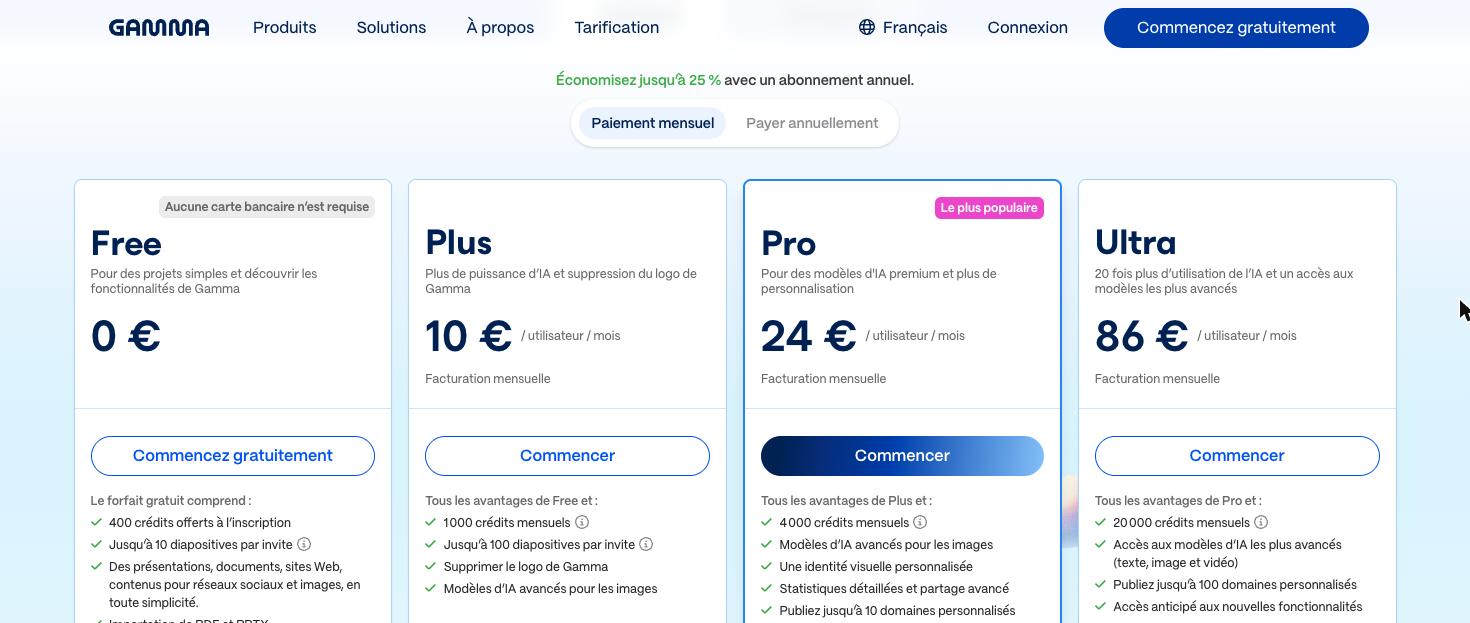
Plus is 10 € per user a month billed monthly, 120 € a year, or 8 € billed yearly, 96 € a year. Pro is 24 € a month, 288 € a year, or 18 € billed yearly, 216 € a year. Ultra is 86 € a month. The page opens on the yearly view. We read 9 € on 12 August and 10 € since 13 September.
What we would check before paying
Generated layouts need editing before a client sees them, so count that time. If your clients expect PowerPoint, check an export first: it loses some of the web layout.
What changed recently
Native iOS and Android apps, and Gamma can be mentioned in Slack to create a deck, document or page from a prompt or from the thread. Source ↗
Read on each vendor's official changelog, not tested by us.
The limits to know
- Credits on the free plan are a one-time allowance, with no monthly refill
- Generated layouts need editing before a client sees them
- Export to PowerPoint loses some of the web-native layout
Pricing & billing commitment
- Rate on record
- €10.00/mo · Plus
- What that figure is
- Month-to-month rate per seat, read on the vendor's monthly view.
- Commitment
- None: payable one month at a time
- The vendor's exact condition
- €10 per user/month billed monthly; €8 per user/month billed annually (€96 per year)
The pricing page, as read
 Partner link
What it costs at 1, 3, 5 and 10 users
Gamma bills per seat, so the invoice follows head count. Calculated at the rate on record, before tax, with no annual commitment.
| Seats | Per month | Per year |
|---|---|---|
| 1 | €10.00 | €120.00 |
| 3 | €30.00 | €360.00 |
| 5 | €50.00 | €600.00 |
| 10 | €100.00 | €1200.00 |
In practice
- Platforms
- Web, iOS, Android
- Integrations
- PowerPoint export, PDF export, Google Drive, Slack
- Setup
- easy: minutes
Gamma in our comparisons
Alternatives to Gamma


Compare side by side:Gamma / CanvaGamma / Beautiful.aiGamma / Figma
Frequently asked questions
What is Gamma?
Gamma is a tool used mainly for client proposals, pitch decks, one-page reports. Main features: generates a deck from a prompt or a document, web-native decks that resize themselves, charts synced from Google Sheets. It has a permanent free plan; the paid entry point is €10.00/mo · Plus.
How much does Gamma cost?
The paid entry point is €10.00/mo · Plus. Month-to-month rate per seat, read on the vendor's monthly view. The exact condition attached to that figure: €10 per user/month billed monthly; €8 per user/month billed annually (€96 per year). Read on the official pricing page on 25.10.2026. Prices move quickly: confirm before subscribing.
Does Gamma have a free plan?
Yes. Gamma publishes a permanent free plan. Check this before settling on it: credits on the free plan are a one-time allowance, with no monthly refill.
What devices and tools does Gamma work with?
According to the vendor's documentation, Gamma runs on: Web, iOS, Android. Documented integrations: PowerPoint export, PDF export, Google Drive, Slack. Listed from the official sources, not tested by us: check your own setup on the free plan.
How we checked this record
The evidence record
- Evidence level
- Vendor documented: Official documentation and pricing page reviewed and dated. No independent verification, no hands-on test recorded.
- Affiliate status
- Partner link: a commission may be paid, at no extra cost to you.
Hands-on test
No automated hands-on test has been completed for this review cycle. This record rests on the vendor's official documentation and pricing page, re-read and dated. We say so rather than imply otherwise.
The research record
Read on the vendor's monthly view, from France; screenshot kept
Read on the vendor's monthly view, from France
Corrected to the month-to-month figure already recorded in this record's own billing condition
Published by us from the vendor's annual view: our error, read on 2026-08-12
Sources
The official pages this record rests on. No tracking links here: these addresses name the vendor.
Evidence freshness
Each kind of check has its own clock and its own threshold. A price ages in weeks and a feature list in months; sharing one date between them would let an old review pass for a recent check.
| Check | When | State |
|---|---|---|
| Pricing | Checked 18 days ago | Fresh |
| Features | Checked 18 days ago | Fresh |
| Privacy & data | Never checked | Not independently checked |
| Hands-on test | Never checked | Not independently checked |
| Page review | Checked 92 days ago | Due soon |
What remains unverified
- No workflow was run inside the product. Everything here comes from the vendor's documentation and public pages.
- Data handling and the privacy policy were not independently verified during this research cycle. We therefore publish no conclusion about security or where data is stored.
- Export terms and the real cost of leaving are not on this record: we have not tested them.