

Murf AI is best for freelancers producing voice-over for training and explainer videos, small teams that need commercial rights on generated voices and creators who already build slides in Canva or PowerPoint. Its clearest advantage: Commercial rights are included from the first paid Studio plan.
- Avoid if
- anyone who needs voice cloning from their own sample on an entry plan
- Cheapest useful plan
- $29.00/mo · Creator
- Free plan
- Yes
- Setup effort
- easy: minutes
- Main limitation
- The free plan has no downloads and no commercial rights, so it is only a trial
- Commercial rights are included from the first paid Studio plan
- The API is pay-as-you-go with credit that does not expire
- Canva and PowerPoint integrations put the voice where the slides already are
- anyone who needs voice cloning from their own sample on an entry plan
- heavy users who would exceed two hours of voice a month on Creator
What it actually does
Studio editor with 200+ voices, styles and tones, Canva integration on paid Studio plans, PowerPoint on Business, dubbing into other languages, text-to-speech API priced per character, conversational voice agents for calls.
Before you pay
Free or Creator
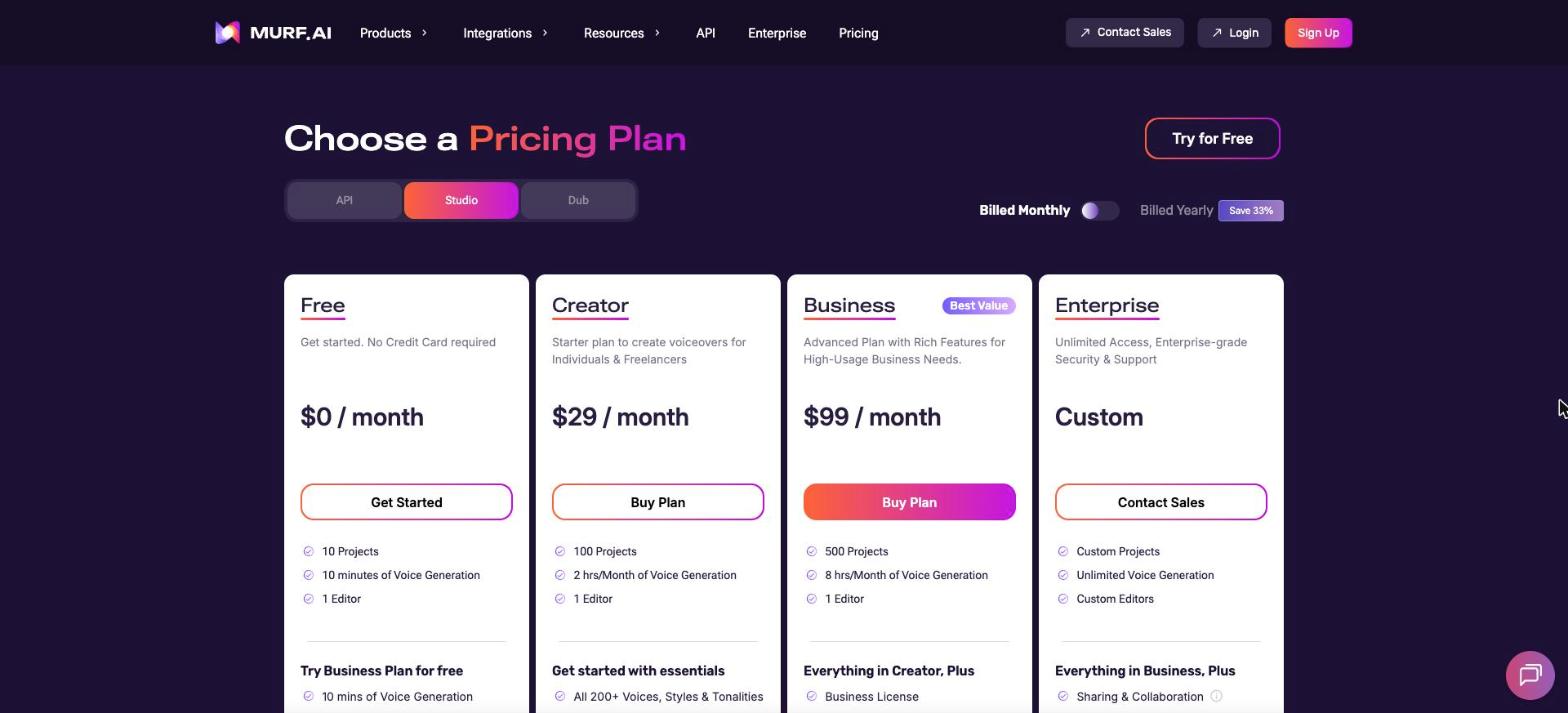
The free plan gives ten minutes of voice with no downloads and no commercial rights, so it is only a trial. Creator includes commercial rights, two hours of voice a month and one editor. Canva and PowerPoint integrations put the voice where the slides already are.
What a year costs
Creator is $29 a month billed monthly, $348 a year, or $19 a month billed yearly, $228 a year. Business is $99 a month, $1,188 a year, with eight hours a month, or $66 billed yearly, $792 a year. We read the same $29 on 10 and 25 October.
What we would check before paying
Which product you need: Studio, the API and Dub are priced separately. The pricing page opens on the API tab, which is pay-as-you-go per character, so switch to Studio before reading the plans.
The limits to know
- The free plan has no downloads and no commercial rights, so it is only a trial
- Creator allows two hours of voice a month and a single editor
- Studio, API and Dub are priced separately, which makes the total cost harder to read
Pricing & billing commitment
- Rate on record
- $29.00/mo · Creator
- What that figure is
- Month-to-month rate per account, read on the vendor's monthly view. The plan is capped by an allowance (credits, tasks or minutes) rather than by time.
- Commitment
- None: payable one month at a time
- The vendor's exact condition
- $29/month billed monthly; $19/month billed yearly ($228 a year)
- Usage cap
- This plan is capped by an allowance (credits, tasks or minutes), not only by time. Going past it costs extra or stops the work, depending on the vendor.
The pricing page, as read
 Partner link
In practice
- Platforms
- Web, API
- Integrations
- Canva, PowerPoint, API
- Setup
- easy: minutes
Murf AI in our comparisons
Alternatives to Murf AI


Compare side by side:Murf AI / ElevenLabsMurf AI / DescriptMurf AI / HeyGen
Frequently asked questions
What is Murf AI?
Murf AI is a tool used mainly for voice-over for videos and courses, narrating presentations, dubbing into another language. Main features: studio editor with 200+ voices, styles and tones, Canva integration on paid Studio plans, PowerPoint on Business, dubbing into other languages. It has a permanent free plan; the paid entry point is $29.00/mo · Creator.
How much does Murf AI cost?
The paid entry point is $29.00/mo · Creator. Month-to-month rate per account, read on the vendor's monthly view. The plan is capped by an allowance (credits, tasks or minutes) rather than by time. The exact condition attached to that figure: $29/month billed monthly; $19/month billed yearly ($228 a year). Read on the official pricing page on 25.10.2026. Prices move quickly: confirm before subscribing.
Does Murf AI have a free plan?
Yes. Murf AI publishes a permanent free plan. Check this before settling on it: the free plan has no downloads and no commercial rights, so it is only a trial.
What devices and tools does Murf AI work with?
According to the vendor's documentation, Murf AI runs on: Web, API. Documented integrations: Canva, PowerPoint, API. Listed from the official sources, not tested by us: check your own setup on the free plan.
How we checked this record
The evidence record
- Evidence level
- Vendor documented: Official documentation and pricing page reviewed and dated. No independent verification, no hands-on test recorded.
- Affiliate status
- Partner link: a commission may be paid, at no extra cost to you.
Hands-on test
No automated hands-on test has been completed for this review cycle. This record rests on the vendor's official documentation and pricing page, re-read and dated. We say so rather than imply otherwise.
The research record
Read on the vendor's monthly view, from France; screenshot kept
Read on the vendor's monthly view, from France
Sources
The official pages this record rests on. No tracking links here: these addresses name the vendor.
Evidence freshness
Each kind of check has its own clock and its own threshold. A price ages in weeks and a feature list in months; sharing one date between them would let an old review pass for a recent check.
| Check | When | State |
|---|---|---|
| Pricing | Checked 18 days ago | Fresh |
| Features | Checked 33 days ago | Fresh |
| Privacy & data | Never checked | Not independently checked |
| Hands-on test | Never checked | Not independently checked |
| Page review | Checked 33 days ago | Fresh |
What remains unverified
- No workflow was run inside the product. Everything here comes from the vendor's documentation and public pages.
- Data handling and the privacy policy were not independently verified during this research cycle. We therefore publish no conclusion about security or where data is stored.
- Export terms and the real cost of leaving are not on this record: we have not tested them.