

Buffer is best for solo freelancers publishing on two or three networks, small teams that want to pay only for the accounts they use and anyone who wants scheduling without an analytics suite attached. Its clearest advantage: Pricing scales one channel at a time, so dropping a client removes one line, not a tier.
- Avoid if
- agencies that need per-client workspaces and approval chains
- Cheapest useful plan
- $6.00/mo · Essentials
- Free plan
- Yes
- Setup effort
- easy: 30 min
- Main limitation
- Cost climbs quickly once you publish to six or more channels
- Pricing scales one channel at a time, so dropping a client removes one line, not a tier
- The free plan is a real product, not a trial: 3 channels, 10 scheduled posts each
- Consistently the simplest scheduler here to set up in an afternoon
- agencies that need per-client workspaces and approval chains
- teams wanting deep social listening or competitor benchmarking
What it actually does
Per-channel pricing, post queue and calendar, with images and video in the same post, rebuilt Insights analytics, community inbox across ten networks, TikTok and YouTube included, Substack Notes publishing, MCP connection to Claude, ChatGPT and Perplexity.
Before you pay
Free or Essentials
The free plan is a real product: three channels and ten scheduled posts on each. A freelancer posting for themselves can stay there. Essentials removes the post limit and is priced per channel; collaboration with other users needs the Team plan.
What a year costs
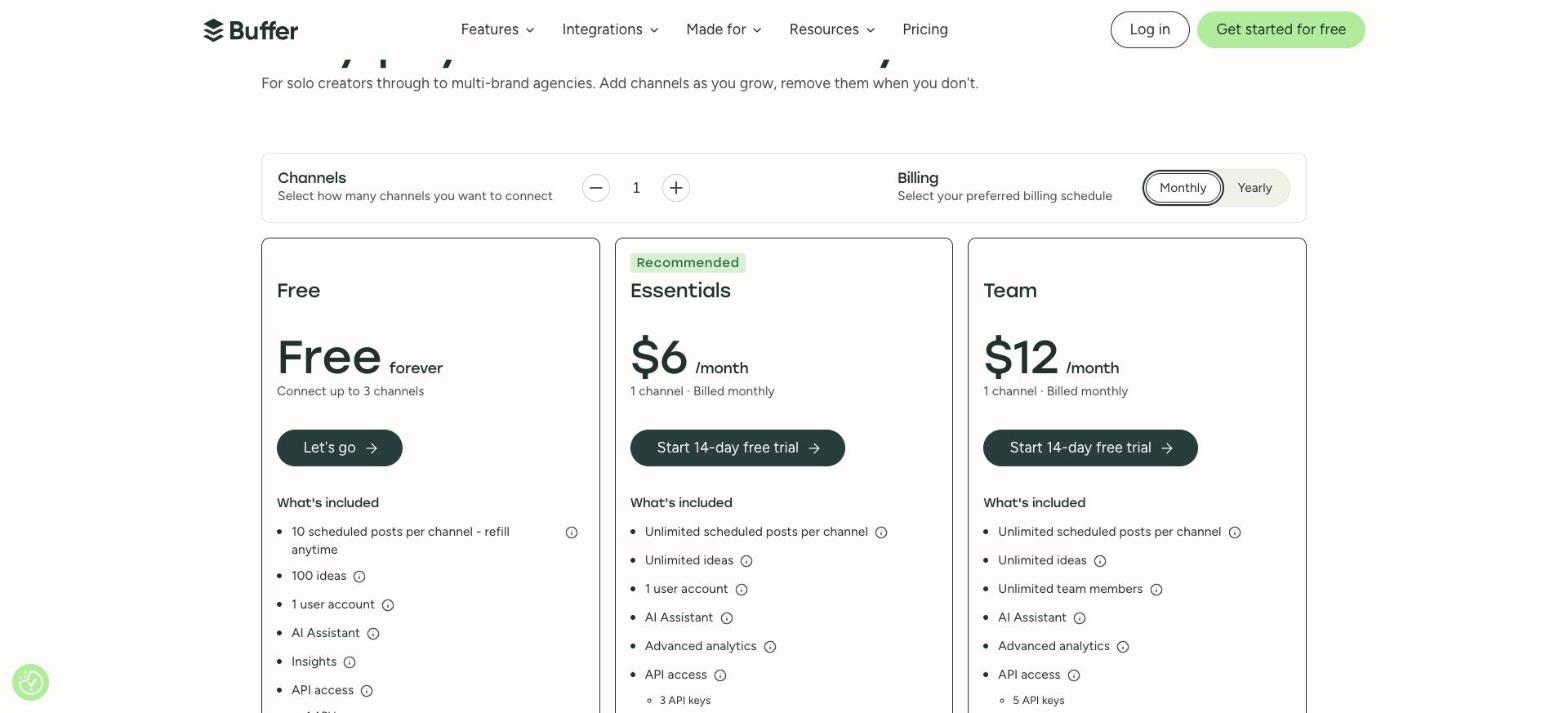
Essentials is $6 per channel a month billed monthly. With five channels that is $30 a month, $360 a year, or $300 a year at $5 per channel on yearly billing. Team is $12 per channel a month, or $10 on yearly billing. We read the same $6 on 5 September, 10 October and 25 October.
What we would check before paying
How many channels you will run: per-channel pricing is cheap for two or three and climbs quickly past six, where a plan priced per brand can cost less. Analytics stop short of what a reporting-heavy agency needs. Paid plans carry a 14-day trial.
The limits to know
- Cost climbs quickly once you publish to six or more channels
- Analytics stop well short of what a reporting-heavy agency needs
- One user account on the entry paid plan; collaboration means the Team plan
Pricing & billing commitment
- Rate on record
- $6.00/mo · Essentials
- What that figure is
- Month-to-month rate per channel, read on the vendor's monthly view.
- Commitment
- None: payable one month at a time
- The vendor's exact condition
- 6 USD per channel/month billed monthly; 5 USD per channel/month billed yearly
The pricing page, as read
In practice
- Platforms
- Web, iOS, Android, Browser extension
- Integrations
- Zapier, Canva, Shopify, API
- Setup
- easy: 30 min
Buffer in our comparisons
Alternatives to Buffer


Compare side by side:Buffer / MetricoolBuffer / HootsuiteBuffer / Later
Frequently asked questions
What is Buffer?
Buffer is a tool used mainly for scheduling posts, queueing a content calendar, drafting post ideas. Main features: per-channel pricing, post queue and calendar, with images and video in the same post, rebuilt Insights analytics. It has a permanent free plan; the paid entry point is $6.00/mo · Essentials.
How much does Buffer cost?
The paid entry point is $6.00/mo · Essentials. Month-to-month rate per channel, read on the vendor's monthly view. The exact condition attached to that figure: 6 USD per channel/month billed monthly; 5 USD per channel/month billed yearly. Read on the official pricing page on 25.10.2026. Prices move quickly: confirm before subscribing.
Does Buffer have a free plan?
Yes. Buffer publishes a permanent free plan. Check this before settling on it: cost climbs quickly once you publish to six or more channels.
What devices and tools does Buffer work with?
According to the vendor's documentation, Buffer runs on: Web, iOS, Android, Browser extension. Documented integrations: Zapier, Canva, Shopify, API. Listed from the official sources, not tested by us: check your own setup on the free plan.
How we checked this record
The evidence record
- Evidence level
- Vendor documented: Official documentation and pricing page reviewed and dated. No independent verification, no hands-on test recorded.
- Affiliate status
- No affiliate link on this record, no commission.
Hands-on test
No automated hands-on test has been completed for this review cycle. This record rests on the vendor's official documentation and pricing page, re-read and dated. We say so rather than imply otherwise.
The research record
Read on the vendor's monthly view, from France; screenshot kept
Read on the vendor's monthly view, from France
Read on the vendor's monthly view
Sources
The official pages this record rests on. No tracking links here: these addresses name the vendor.
Evidence freshness
Each kind of check has its own clock and its own threshold. A price ages in weeks and a feature list in months; sharing one date between them would let an old review pass for a recent check.
| Check | When | State |
|---|---|---|
| Pricing | Checked 18 days ago | Fresh |
| Features | Checked 41 days ago | Fresh |
| Privacy & data | Never checked | Not independently checked |
| Hands-on test | Never checked | Not independently checked |
| Page review | Checked 84 days ago | Fresh |
What remains unverified
- No workflow was run inside the product. Everything here comes from the vendor's documentation and public pages.
- Data handling and the privacy policy were not independently verified during this research cycle. We therefore publish no conclusion about security or where data is stored.
- Export terms and the real cost of leaving are not on this record: we have not tested them.