

Trello is best for freelancers tracking a simple client pipeline, small teams that prefer visual kanban boards and teams moving from spreadsheets to shared task tracking. Its clearest advantage: Free plan supports up to 10 collaborators and 10 boards per Workspace.
- Avoid if
- portfolio managers needing cross-project resource reporting
- Cheapest useful plan
- $6.00/mo · Standard
- Free plan
- Yes
- Setup effort
- easy: minutes
- Main limitation
- Free plan caps each Workspace at 10 boards
- Free plan supports up to 10 collaborators and 10 boards per Workspace
- The board metaphor is easy to understand without training
- Unlimited Power-Ups per board are included on Free
- portfolio managers needing cross-project resource reporting
- complex projects with deep dependencies and approval workflows
What it actually does
Kanban boards with cards and lists, Inbox and Planner for capturing and scheduling to-dos, built-in automation command runs, Power-Ups and app integrations.
Before you pay
Free or Standard
The free plan allows up to 10 collaborators and 10 boards per Workspace, with unlimited Power-Ups. A freelancer or a small team often stays there for good. Standard lifts the board limit and the 10 MB file cap, and Premium adds cross-project views and stronger admin controls.
What a year costs
Standard is $6 per user a month without commitment, $72 a year per user, or $5 a month on yearly billing, $60 a year. A three-person team pays $216 a year month to month or $180 on yearly billing. Premium is $12.50 per user a month, or $10 on yearly billing. Our first reading, on 10 August, noted $5, the yearly price; from 12 September the record holds the month-to-month price, so this is a correction, not a price rise.
What we would check before paying
How many boards you really keep open: the limit of 10 per Workspace is the usual reason to upgrade. If you mostly need a personal to-do list rather than a shared board, the Inbox and Planner on the free plan may cover it.
The limits to know
- Free plan caps each Workspace at 10 boards
- Free storage is limited to 10MB per file
- Cross-project views and stronger admin controls require Premium
Pricing & billing commitment
- Rate on record
- $6.00/mo · Standard
- What that figure is
- Month-to-month rate per seat, read on the vendor's monthly view.
- Commitment
- None: payable one month at a time
- The vendor's exact condition
- $5 per user/month billed annually; $6 per user/month billed monthly
The pricing page, as read
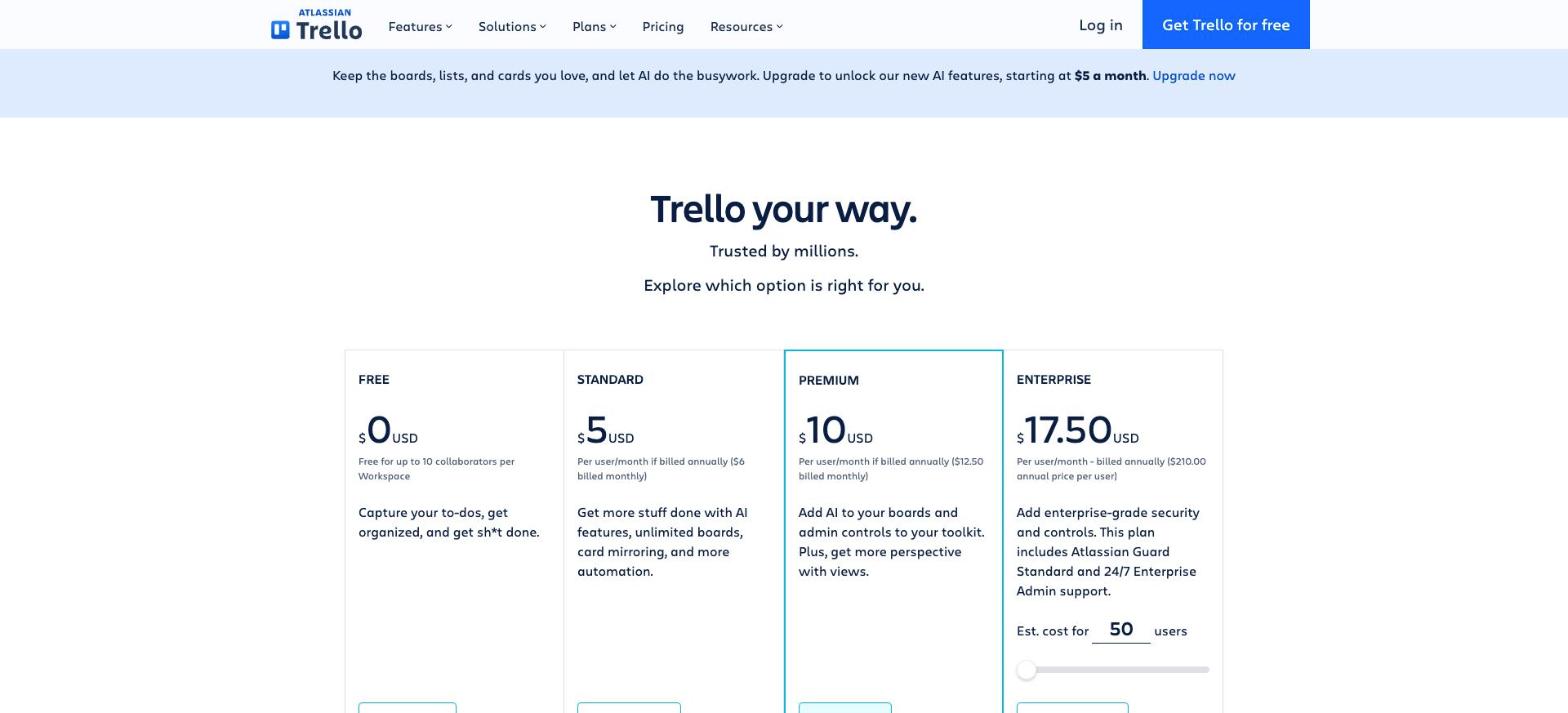
What it costs at 1, 3, 5 and 10 users
Trello bills per seat, so the invoice follows head count. Calculated at the rate on record, before tax, with no annual commitment.
| Seats | Per month | Per year |
|---|---|---|
| 1 | $6.00 | $72.00 |
| 3 | $18.00 | $216.00 |
| 5 | $30.00 | $360.00 |
| 10 | $60.00 | $720.00 |
In practice
- Platforms
- Web, macOS, Windows, iOS, Android
- Integrations
- Slack, Jira, Microsoft Teams, Miro, Confluence
- Setup
- easy: minutes
Trello in our comparisons
Alternatives to Trello


Compare side by side:Trello / ClickUpTrello / AsanaTrello / Todoist
Frequently asked questions
What is Trello?
Trello is a tool from Atlassian, used mainly for kanban task management, content and client pipelines, lightweight team planning. Main features: kanban boards with cards and lists, Inbox and Planner for capturing and scheduling to-dos, built-in automation command runs. It has a permanent free plan; the paid entry point is $6.00/mo · Standard.
How much does Trello cost?
The paid entry point is $6.00/mo · Standard. Month-to-month rate per seat, read on the vendor's monthly view. The exact condition attached to that figure: $5 per user/month billed annually; $6 per user/month billed monthly. Read on the official pricing page on 25.10.2026. Prices move quickly: confirm before subscribing.
Does Trello have a free plan?
Yes. Trello publishes a permanent free plan. Check this before settling on it: free plan caps each workspace at 10 boards.
What devices and tools does Trello work with?
According to the vendor's documentation, Trello runs on: Web, macOS, Windows, iOS, Android. Documented integrations: Slack, Jira, Microsoft Teams, Miro, Confluence. Listed from the official sources, not tested by us: check your own setup on the free plan.
How we checked this record
The evidence record
- Evidence level
- Vendor documented: Official documentation and pricing page reviewed and dated. No independent verification, no hands-on test recorded.
- Affiliate status
- No affiliate link on this record, no commission.
Hands-on test
No automated hands-on test has been completed for this review cycle. This record rests on the vendor's official documentation and pricing page, re-read and dated. We say so rather than imply otherwise.
The research record
Read on the vendor's monthly view, from France; screenshot kept
Confirmed in the pricing page's text, which renders the monthly figure, from France
Corrected to the month-to-month figure already recorded in this record's own billing condition
Published by us from the vendor's annual view: our error, read on 2026-08-10
Sources
The official pages this record rests on. No tracking links here: these addresses name the vendor.
Evidence freshness
Each kind of check has its own clock and its own threshold. A price ages in weeks and a feature list in months; sharing one date between them would let an old review pass for a recent check.
| Check | When | State |
|---|---|---|
| Pricing | Checked 18 days ago | Fresh |
| Features | Checked 41 days ago | Fresh |
| Privacy & data | Never checked | Not independently checked |
| Hands-on test | Never checked | Not independently checked |
| Page review | Checked 94 days ago | Due soon |
What remains unverified
- No workflow was run inside the product. Everything here comes from the vendor's documentation and public pages.
- Data handling and the privacy policy were not independently verified during this research cycle. We therefore publish no conclusion about security or where data is stored.
- Export terms and the real cost of leaving are not on this record: we have not tested them.